Early bird$6 for early buyers

Your coding agents, alive on every page.

Each Claude Code, OpenCode and omp session becomes a pet that walks along the bottom of Chrome. See who needs you, and answer from any tab.

One-time purchase · Lifetime updates · Works with Claude Code, OpenCode and omp

Works with

  • Claude Code
  • OpenCode
  • omp

In Chrome, Arc, Brave, Edge and other Chromium browsers.

Features

Everything your agents need from you. On every page.

Approve from any tab.

When an agent wants to run a command or edit a file, its pet starts bouncing. Click it, read exactly what it wants, and answer Allow, Always or Deny right where you are.

Claude Code and OpenCode. omp approvals stay in the terminal.
Know who needs you.

A capsule over each pet says what it’s doing. The toolbar badge counts the sessions waiting on you.

Reply without switching windows.

Read the agent’s latest answer and send its next message from whatever you’re reading.

Your Cat.

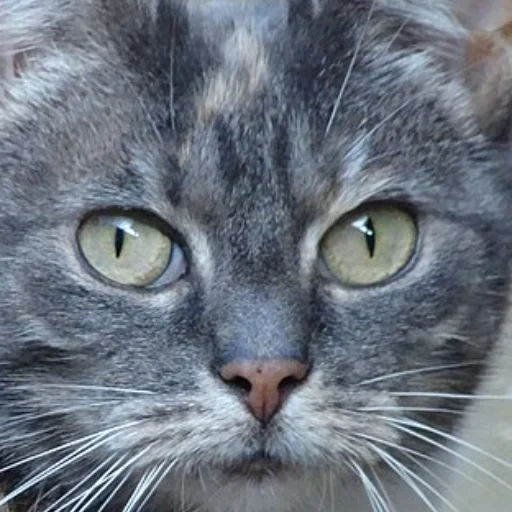
Upload a photo of your own cat. Crop it into the circle, pick any body colour, give it a name, and it walks your pages as one of your pets.

A photo of a grey tabby cat's face with a circle marking the crop

Try a body colour, or tap the name to rename

Eight pets, each with a name.

Cats, foxes and axolotls. Every live session gets a different one. Rename any pet, or despawn one without stopping its session.

  • MangoCat
  • BubblesAxolotl
  • EmberFox
  • PebbleCat
  • SkyeAxolotl
  • FrostFox
  • MidnightCat
  • SunnyAxolotl

Gather in a corner.

In Gather mode the pets walk to a corner and sit together, purring and grooming. Roam lets them wander.

Answer from a notification.

In another app? A desktop notification tells you which pet needs you, with Allow and Deny right on it.

Private by design.

Everything runs on your computer. No accounts, no cloud. Your code and prompts never leave your machine.

Your computer
Your agents
Agent Pets helper127.0.0.1
Chrome

The only network calls: the license check with Dodo Payments and update checks with npm.

How it works

Set up in about a minute.

One command connects your agents. Chrome does the rest.

Terminal
$ npx agent-pets init✓ Claude Code hooks added to ~/.claude/settings.json✓ omp extension installed at ~/.omp/agent/extensions/agentpets.ts✓ OpenCode plugin installed at ~/.config/opencode/plugins/agentpets.js✓ Chrome extension in ~/.agentpets/extension✓ Daemon running on 127.0.0.1 (starts automatically at login)
  1. Run one command.

    npx agent-pets init connects Claude Code, OpenCode and omp, installs the helper and puts the extension in ~/.agentpets/extension.

  2. Load it in Chrome.

    Open chrome://extensions, turn on Developer mode, then click Load unpacked and choose that folder, or just drag it in.

  3. Pin it, paste your key.

    Pin Agent Pets, open it and paste the license key from your receipt. Start a session and say hello to your first pet.

Updates install automatically. Requires Node.js 18 or later.

Pricing

Pay once. Keep every update.

No subscription and no account.

Agent Pets

Early-bird price $6 one-time, regular price $9

$9one-time

Early-bird price for early buyers. Then $9.

Discount applied at checkout.

  • All 8 pets, plus Your Cat
  • Approve, deny and reply from any tab
  • Claude Code, OpenCode and omp
  • One license for up to 3 browsers
  • Lifetime updates, installed automatically
  • Runs locally. No account, no cloud.
Get it for $6Buy Agent Pets — $9

14-day refund, no questions asked.
Payments handled by Dodo Payments (merchant of record), including taxes and VAT. Refund policy

Works in Chrome, Arc, Brave, Edge and other Chromium browsers on macOS, Linux and Windows. Requires Node.js 18+.

FAQ

Questions, answered.

Why isn’t it on the Chrome Web Store?

By design, Agent Pets is installed directly. npx agent-pets init puts the extension in ~/.agentpets/extension, and you load it once through Chrome’s Developer mode (Load unpacked). After that, updates install automatically, so you never repeat it.

Which agents, operating systems and browsers does it support?

Agents: Claude Code, OpenCode and omp. Browsers: Chrome and other Chromium browsers such as Arc, Brave and Edge.

On macOS the helper starts automatically at login. On Linux and Windows it works too, but there’s no auto-start yet: run npx agent-pets start and keep it running. Node.js 18 or later is required.

Is my code sent anywhere?

No. Everything runs on your computer: a small helper on 127.0.0.1 talks to your agents and to the extension. There are no accounts and no cloud, and your code and prompts never leave your machine.

The only network calls are the license check with Dodo Payments and update checks with npm. See the privacy policy.

How do updates work?

Automatically. Agent Pets checks npm for new versions and installs them for you, and the extension picks them up on its own. Every future update is included in your one-time purchase.

How many browsers can I use with one license?

Up to 3. Activate the same license key in Chrome on your laptop, Arc on your desktop, and one more.

Can I get a refund?

Yes. Ask within 14 days of purchase, no questions asked: email support@getagentpets.com or contact Dodo Payments, who processed your order. See the refund policy.

Does it slow my agent down?

No. The hooks never block your agent. A permission request waits for an answer from a pet only while that pet is on screen, and the prompt in your terminal keeps working as usual, so you can answer in either place.